 VloamClip
Copy repeatedly. Paste in order.
Lightning-fast data transfer across apps
Stop switching between windows back and forth. VloamClip gives you an ordered FIFO/LIFO Paste Queue, instant full-text history search, and pinned snippets. 100% local-first SQLite storage with zero cloud sync.
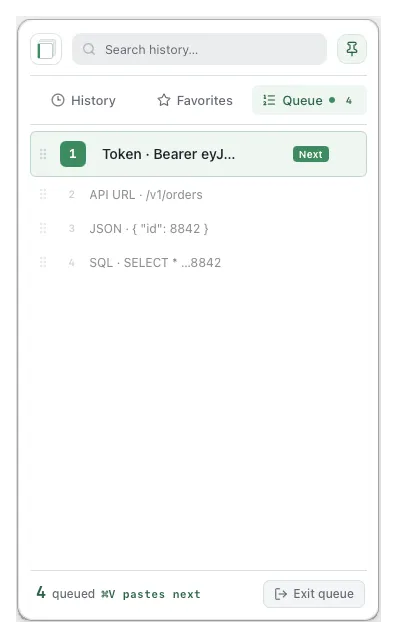
Zip through repetitive cross-app transfers
Press ⌘C consecutively in your source app, switch to the destination, and press ⌘V repeatedly to paste in order.
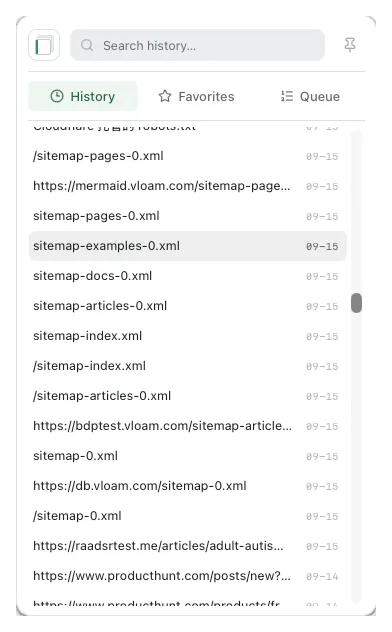
Instant fuzzy search across thousands of local clips
Never lose a copied snippet again. Trigger instantly with ⌥V, type fuzzy keywords, and navigate purely via keyboard.
Sub-millisecond SQLite queries
Handles 10,000+ records smoothly without lag or battery drain.
Spacebar instant quick-look
Preview large images, JSON trees, and markdown without pasting into an editor.
100% offline with password exclusion
Zero cloud leaks. Automatically ignores sensitive clips from password managers.
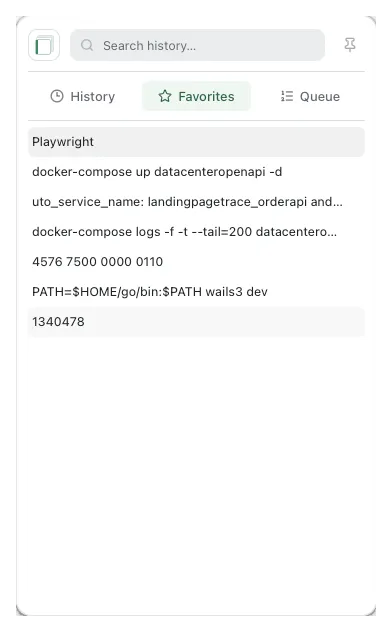
Pin your most frequent snippets for instant reuse
Star your tax IDs, SSH public keys, canned responses, and boilerplate templates. Never deleted on cleanups.
Supercharge Your Daily Copy-Paste
Say goodbye to tedious window-switching with a clipboard tailored for developers and power users.
Ordered FIFO/LIFO Paste Queue
Copy multiple items across websites or documents in one go. Switch to your destination once, and press ⌘V repeatedly to paste in sequence.
Instant Fuzzy Search
Fuzzy-search across thousands of clips in milliseconds. Space bar opens instant preview of formatted JSON and code snippets.
Pinned Snippets & Templates
Pin recurring invoice titles, SSH commands, canned responses, and templates. They permanently survive automated history cleanup.
100% Local-First & Private
Clips are stored exclusively in on-device SQLite. Zero content is sent to external servers. Safe with tokens and sensitive credentials.
Lightweight & Native UX
Quiet menu bar & tray integration. Starts instantly, uses minimal memory, and stays completely out of your way until called.
Native for macOS and Windows
Official direct download links for your desktop operating system
macOS
macOS 12.0+ Monterey 及更新版本- Universal binary (Apple Silicon & Intel)
- Native menu bar tray, dark mode support
- Requires Accessibility permission on first launch
Windows
Windows 10 / 11 (64位)- Clean 64-bit installer with zero bloat
- System tray integration, coexists with Win+V
- Supports startup launch & custom hotkeys
15-Day Free Trial · One-Time Lifetime License
Enjoy 15 days of unrestricted full access. Unlock once for lifetime access including all future updates.
Sign in for full access
Lifetime updates included
Card Checkout
Instant automatic activation via secure PCI-DSS checkout
- 15-day full-featured free trial upon sign-in
- License binds directly to your checkout email
- Instant automatic activation after payment
- Includes all future updates (one-time purchase)
- Secure PCI-DSS compliant checkout
Use the same email at checkout and when you sign in to VloamClip.
By continuing to checkout, you agree to the Terms and acknowledge the Privacy Policy.
Payment received. Sign in to VloamClip with the email you used at checkout.
FAQ
Is it free?
Sign in for a 15-day full-app trial. A one-time $5.99 unlock covers long-term use; later we plan to switch to subscription pricing.
How do I pay?
Open Pricing and click Unlock now—that is the only button that starts checkout. You do not need to be signed in. Enter your email at card checkout—that email is unlocked. Then sign in to VloamClip with the same address.
Which account is unlocked after payment?
The email address you enter at checkout. If you already use VloamClip, pay with that same email. A new address creates (or unlocks) that account when you sign in.
Which platforms are supported?
macOS and Windows—use the download buttons on this page. On macOS, grant Accessibility on first launch.
Is clipboard content uploaded?
No. History stays in a local database and is never sent to external servers.
How is this different from the system clipboard?
The system clipboard keeps the last copy. VloamClip adds a Paste Queue so you can paste several clips in the order you copied—plus searchable history and favorites.
Send feedback
Bug report, feature idea, or unlock question — we’ll read every note.
Download and start the trial
macOS and Windows. Sign in for 15 days full access. Ready to unlock? Use Pricing above.